
November 11, 2026
Introduction
If you work with big data on Databricks, you have probably heard the word "partitioning." It sounds technical, but the idea is simple. Partitioning means splitting your data into smaller, organized folders based on a column value, like date or country. This helps Databricks read only the data it needs, instead of scanning everything.
Choosing the right partition strategy can make your queries much faster and your storage costs lower. Choosing the wrong one can slow things down and create extra problems. In this blog, we will explain what partitioning is, why it matters, and how to pick the best strategy for your data.
What is partitioning?
Think of a big library with millions of books. If all the books were placed in one giant pile, finding a single book would take forever. But if the books are organized into sections, like fiction, history, and science, and then further by author's name, finding a book becomes much faster.
Partitioning works the same way for data. When you partition a table by a column, Databricks creates separate folders for each unique value in that column. When you run a query that filters on that column, Databricks only reads the matching folders. This is called partition pruning, and it is one of the biggest reasons partitioning helps performance.
Why Partition Strategy Matters

However, partitioning is not always helpful. If done incorrectly, it can actually make things slower. This is why choosing the right strategy is so important.
Common Partitioning Strategies
1. Partition by Date
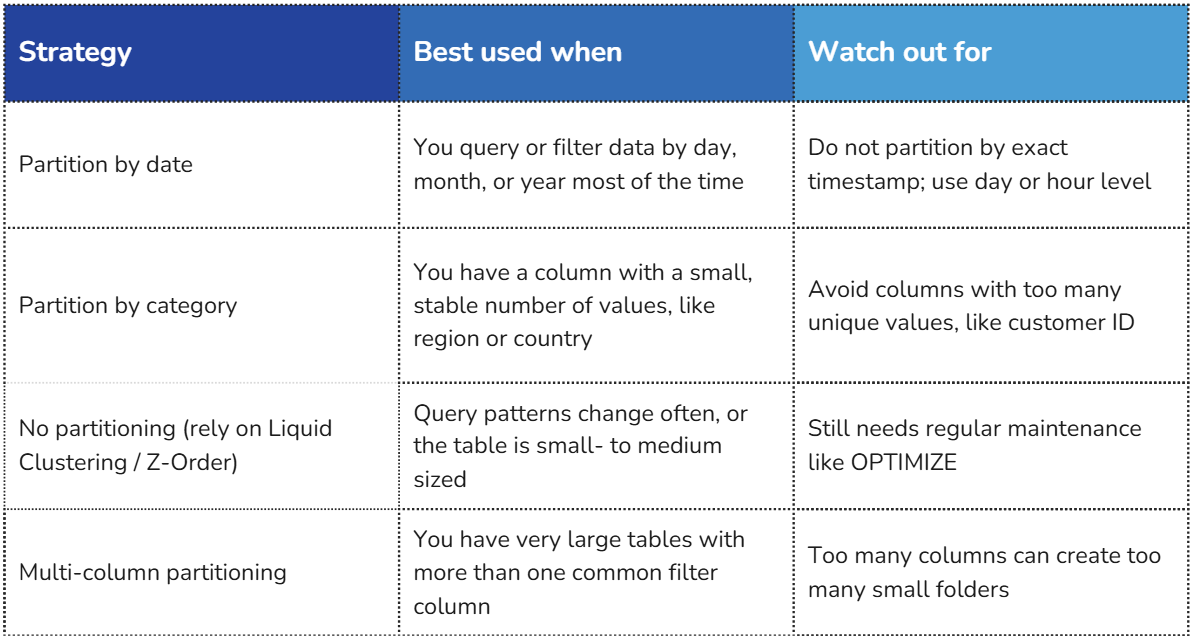
This is the most common and often the safest choice. Many datasets, like logs, transactions, or events, naturally grow over time. Partitioning by year, month, or day lets you quickly filter data for a specific time range.
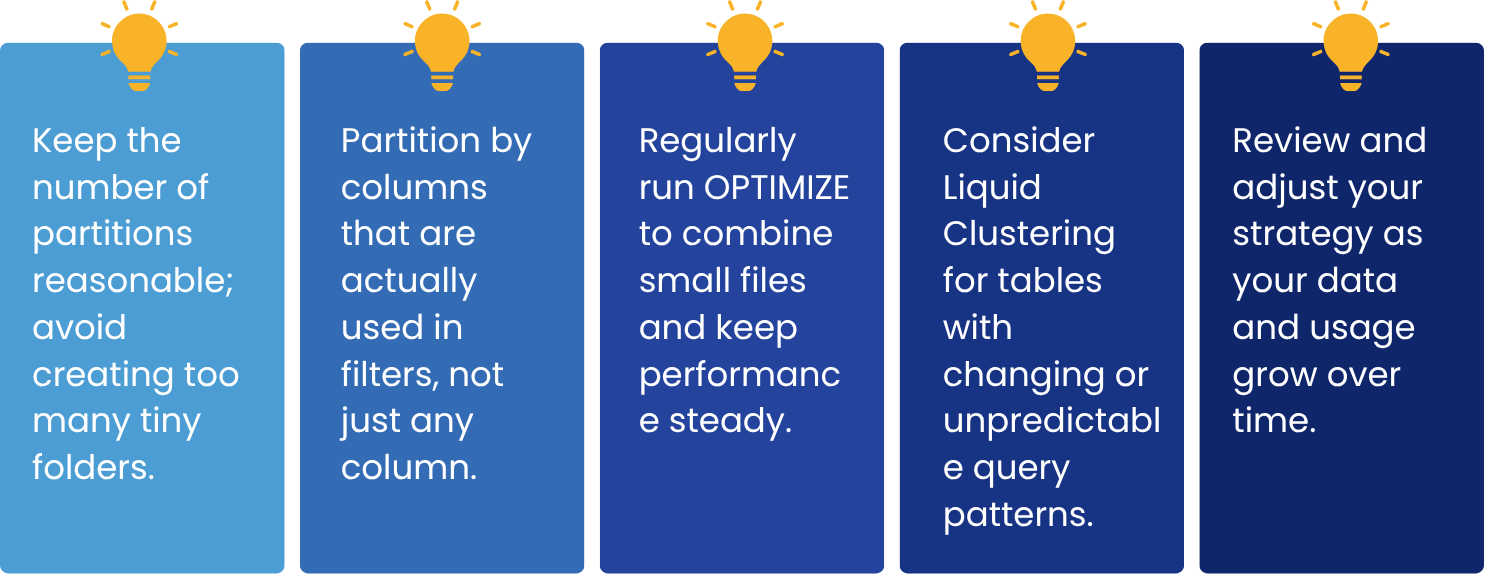
A good practice is to partition at the day level, not by exact timestamp. Partitioning by timestamp creates too many tiny folders, which slows things down instead of speeding them up.
2. Partition by Category
If your data has a column with a small number of repeating values, such as region, department, or product category, this can be a good partition column. The key is choosing a column with a limited number of unique values.
3. Avoid Over-Partitioning
A common mistake is partitioning a table by a column with too many unique values, like a customer ID or email address. This creates thousands or millions of tiny folders, which actually slows down queries and wastes storage. This problem is sometimes called the "small files problem."
4, Multi-Column Partitioning
Sometimes you frequently need to filter data by more than one column, such as country and date together. In these cases, you can partition by more than one column. But be careful, because adding too many partition columns can multiply the number of folders quickly. A good rule is to keep it to one or two columns at most.
5. Consider Liquid Clustering Instead
Databricks now offers a newer approach called Liquid Clustering. Instead of creating fixed folders, it automatically organizes data based on how it is queried. This is a great option when your query patterns change often, or when traditional partitioning creates too many small files. For many new tables, Liquid Clustering is now recommended over manual partitioning.
A Real-Life Example
Imagine an e-commerce company that stores every order placed on its website in a Databricks table called orders. The table has grown to billions of rows over three years, and the data team notices that dashboards and reports have gotten noticeably slower.
The team looks at how analysts actually query the table and finds two clear patterns: almost every query filters on order date to look at a specific day, week, or month, and many queries also filter on country to compare regional sales.
heir first instinct is to partition by order_id, since it is the table's unique identifier. This turns out to be a mistake: with millions of distinct order IDs, Databricks ends up creating millions of tiny folders, most of which now holding just one or two rows. Queries actually get slower, not faster, because of the small files problem described earlier.
Instead, the team applies the strategies from this blog: they partition the table by order date at the day level, since that matches how most queries filter, and the value naturally grows over time. Because country has only a small, stable set of values, they add it as a second partition column, giving a two-column strategy of date plus country rather than date alone.
The result: a dashboard that used to scan the entire multi-year table just to show "yesterday's sales in Germany" now reads only the handful of folders matching that date and country. Query times drop from minutes to seconds, and monthly compute costs fall as well, since far less data is scanned per query. The team also schedules a weekly OPTIMIZE job to keep file sizes healthy as new orders arrive each day, and plans to evaluate Liquid Clustering if query patterns become less predictable in the future.
Quick Comparison
How to Choose the Right Strategy
Ask yourself these simple questions before deciding:
-
How will people usually query this table? Look at the columns used in WHERE clauses most often.
-
How many unique values does the column have? Fewer values usually work better for partitioning.
-
How large is the table? Small tables often do not need partitioning at all.
-
Will the data grow steadily over time? If yes, date-based partitioning is usually a safe choice.

Best Practices to Remember
Conclusion
Partitioning is a simple but powerful tool for Databricks. When done right, it makes your queries faster, your storage more efficient, and your data easier to manage. The key is to understand how your data will be queried and to choose a strategy that matches those patterns.
Start simple, monitor performance, and adjust as needed. With the right partition strategy, you will get the most out of your Databricks environment while keeping costs and complexity under control.
Tag(s):